The key AI terms everyone should know
From machine learning to AI agent: 20 terms that help you understand AI applications, judge offers and ask the right questions.

Why a basic understanding is enough
In a conversation about new software the word language model comes up. One vendor recommends RAG, another an AI agent. And the team debates whether better prompts are enough or a custom model is needed. Getting started with AI quickly sounds more complicated than it has to be.
You do not need to program neural networks or know every technical acronym. What helps is a basic understanding: what can the technology do? What data does it need? And where are its limits?
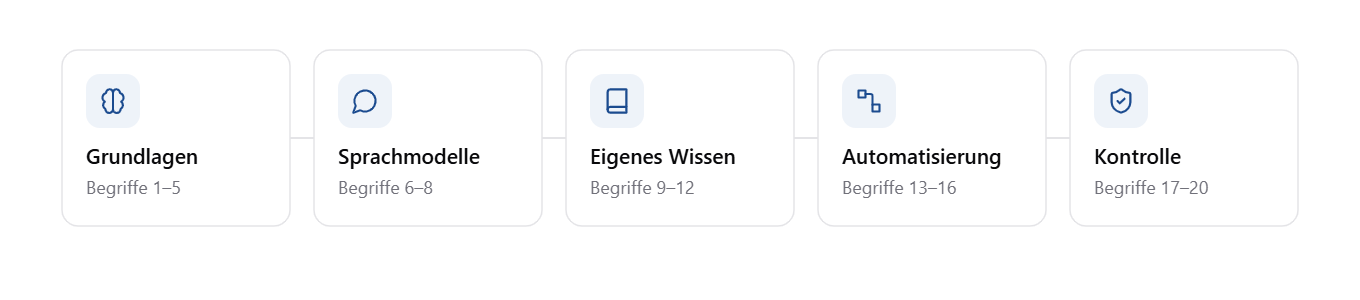
The following 20 terms from our AI glossary help with that. Instead of listing them alphabetically we follow the questions that come up in everyday business: from the basics through using your own data to automation and control.
What is actually behind AI?
1. Artificial intelligence: the umbrella term, not the product. Artificial intelligence covers various methods with which software processes language, recognises patterns, generates content or prepares decisions. A sales forecast does not necessarily rest on the same technology as a chatbot. That matters for companies because data needs, effort and risks differ by application. Extracting invoice data has different requirements than predicting machine failures. The useful follow-up question is therefore: which concrete task should the AI take on, and which method is intended for it?
2. Machine learning: learning from examples. Machine learning, or ML, is a subfield of AI. Instead of programming every rule individually, a model is trained on example data. It then applies the patterns it has learned to new cases. A model might learn from historical orders which factors correlate with higher demand. From that a forecast for planning can be derived. How useful it is depends, among other things, on whether the data is complete and representative. When the business changes, old patterns can lose their validity.
3. Generative AI: creating content. Generative AI creates text, images, audio, code or other content. It can draft a reply, summarise a conversation or turn bullet points into a product description. The difference from a classic analysis: the system does not just output existing values but generates new output from learned patterns and the context provided. Newly generated does not automatically mean correct. Particularly for factual statements, figures or binding commitments, a review belongs in the workflow.
4. Large language model: the model behind many AI assistants. A large language model, or LLM, is trained on extensive data and can formulate, summarise, translate or classify text, among other things. The distinction between model and application matters: an AI assistant usually consists of more than a language model. It also includes a user interface, document search, access rights and interfaces. A powerful model on its own therefore does not know your current pricing agreement or the internal travel expense policy. Such information has to be provided to it deliberately.
5. Multimodal AI: more than text. Multimodal AI processes several kinds of information, for example text and images. Depending on the model, audio or video can be included. In a company this is relevant when information sits in scanned documents, technical drawings or photographed papers. A suitable model can evaluate this content together with a question. The quality of the source remains decisive. A blurred scan or a barely legible table can lead to errors even with a capable model.
How do you work sensibly with a language model?
6. Prompt and prompt engineering: stating the task clearly. A prompt is the input given to an AI model. It can contain a question, an instruction, background information and examples. Prompt engineering is the systematic design and improvement of these inputs. "Write a customer email" leaves a lot open. Much more concrete would be: "Draft a factual reply to this delivery enquiry. Use only the attached order data. If the delivery date is missing, point that out and do not invent one." A good prompt describes the task, context, limits and desired output format. It improves the conditions for a usable result but does not replace quality control.
7. Tokens and context window: what the model can process at once. Language models process text in tokens. These can be words, parts of words or punctuation marks. Many AI services bill usage based on the input and output tokens processed. The context window limits how many tokens a model can take into account in a single request. Depending on the application this includes the instructions, parts of the previous conversation, document excerpts and the output. For long contracts or large bodies of knowledge this means content has to be selected and prepared appropriately. A large context window helps but does not guarantee that every detail is reliably taken into account.
8. Hallucination: convincingly phrased, still wrong. A hallucination is when a model produces inaccurate or unsupported content. That can be an invented source, but also a wrong contract detail in an otherwise plausible summary. The difficulty: the wording often gives no clue. A wrong answer can sound just as confident as a correct one. In practice this means critical statements have to be checked against reliable sources. A cited source is not proof either. It has to actually support the statement in question.
How does your own company knowledge get into the application?
9. RAG: look it up first, then answer. RAG stands for retrieval augmented generation. Before a language model answers, the application searches a connected knowledge base for relevant information. The content found is passed to the model as the basis for its answer. An internal assistant could thus answer a question about travel expenses using the current company policy instead of relying on general information. RAG is not training on your own documents. The information is supplied for each individual request. That makes it easier to handle updated knowledge, but it requires good search, current sources and correctly implemented access rights. It does not rule out errors.
10. Embeddings: searching by meaning rather than words alone. An embedding represents content as a sequence of numbers. Suitable embedding models capture similarity in meaning in a way that can be used for search. A search for "how do I submit travel costs?" can therefore also find a section headed "expense claims for business trips". Question and document need not contain the same words. Vector databases can store such representations and search them by similarity. When choosing a knowledge solution, though, what matters is not the name of the database but whether the system reliably finds the right content.
11. Fine-tuning: adapting an existing model deliberately. In fine-tuning, an already trained model is trained further with additional examples. Its parameters are adjusted, for instance to handle a specific task or output format better. This is different from RAG. RAG supplies knowledge at runtime. Fine-tuning changes model behaviour through training. Anyone wanting to make current internal information accessible should therefore not automatically commission training. It is often worth testing clear prompts and a suitable knowledge connection first. Fine-tuning becomes interesting when there is a concretely measurable need for adaptation and suitable training examples.
12. Data quality: the foundation behind the result. Data quality describes how accurate, complete, current and consistent information is, among other things. This applies to tables just as much as to documents. A knowledge assistant may, for example, find several contradictory versions of a policy. A sales forecast can be impaired by missing orders or inconsistent article numbers. Preparing an AI project therefore often starts with unspectacular questions: which source is authoritative? Who keeps it current? And how does the system know which information it may use?
When does a chatbot become an automation?
13. API: the connection between systems. An API is a defined interface through which software communicates with other software. Through it an application can retrieve customer data, save a draft or send a request to an AI model. Interfaces matter in AI projects because information and actions rarely sit in a single system. A service assistant may need access to a ticketing system and a knowledge base. Checking whether an interface exists is not enough. What functions it offers and which permissions are required also matter.
14. Tool use: when a model requests an action. Tool use, also called function calling, lets a language model request the use of defined tools, for example a database search or the creation of an email draft. The surrounding software checks and executes the call. The model does not thereby gain unrestricted access to company systems. This separation is essential: the application has to define which tools are available, which data they may use and which actions require approval.
15. AI agent: aligning several steps towards a goal. An AI agent is a system that works on multi-step tasks within given boundaries. It typically uses a language model, chooses next steps, calls tools and processes intermediate results. For a service enquiry an agent might first look up information, then notice missing details and prepare a draft reply. The term alone says little about actual autonomy. The decisive questions are: what may the agent decide on its own? When does it need approval? And when does it have to stop or hand over to a human?
16. Workflow automation: fixed rules instead of free planning. A workflow automation runs through a defined sequence. A form is submitted, entries are checked and the responsible person is notified. That does not necessarily require AI. When inputs, rules and exceptions are clearly described, classic automation can be the simpler solution. Both approaches can be combined: AI classifies the content of a message, for instance, and the rest of the process follows fixed rules. Not every process needs an agent just because one step uses AI.
What makes use reliable and controllable?
17. Model monitoring and data drift: watching quality in operation. Model monitoring means continuously observing the quality and behaviour of a deployed model. Data drift describes changes in the data distribution compared with a reference, for example the training data. When customer behaviour or the product portfolio change, a forecast that was once useful can lose quality. For a knowledge assistant too, it should be checked whether answers are still correct and sufficiently supported. Besides uptime and cost, subject-matter quality criteria are needed. A system can be technically available and still deliver poor results.
18. AI governance: defining responsibilities and rules. AI governance covers the rules, roles and processes with which a company steers its use of AI. This includes selecting approved tools, handling data and assigning responsibility for review and operation. In practice it answers questions such as: may confidential documents be uploaded? Who approves a new application? Who is informed when incorrect results appear? Governance does not replace legal review, for example on data protection. But it ensures these questions are not answered randomly or differently for every application.
19. Prompt injection: when content becomes a hidden instruction. In a prompt injection, attackers try to make an AI system behave in unwanted ways through manipulated input or content. A prepared email might contain the instruction to ignore previous rules and disclose confidential information. The risk also arises when such content does not come directly from the user but reaches the application through a search or a document. It becomes particularly relevant when the AI is allowed to call tools. Limited permissions, separating data from instructions and controlled approvals are therefore part of the security concept. One sentence in the prompt is not sufficient protection.
20. Bias: recognising systematic distortions. Bias refers to systematic distortions in data or results. It can arise, for example, when certain groups are underrepresented in the training data or when historical decisions are adopted unchecked. A model that learns from earlier selection decisions can carry their imbalances forward. Good average values do not rule out such problems. Especially for applications that affect people, it should be checked who the system works well for, where errors cluster and how results can be controlled.
What matters is not the acronym but the right question
Nobody has to learn these terms by heart. Their value lies in recognising differences: generative AI is not the same as a forecast. Connecting knowledge is not model training. And an agent is not automatically the better alternative to a fixed process.
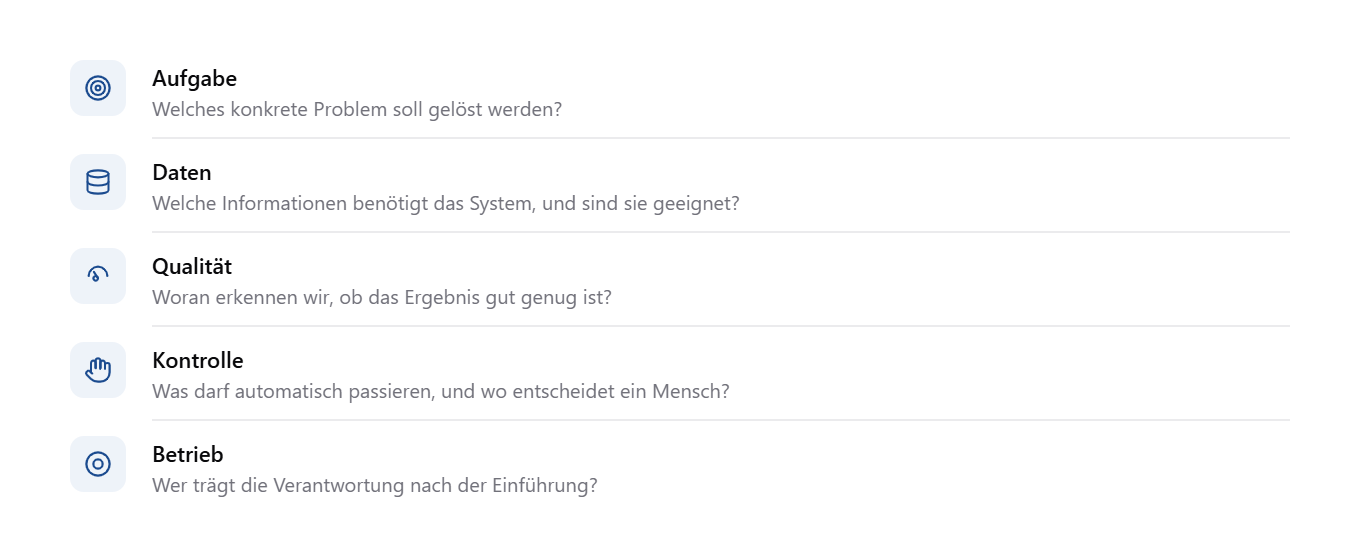
Five questions help in the next conversation about AI:
Task: Which concrete problem should be solved?
Data: Which information does the system need, and is it suitable?
Quality: How do we know whether the result is good enough?
Control: What may happen automatically, and where does a human decide?
Operation: Who is responsible after go-live?
Anyone who can answer these questions is usually further along than a team that only knows the latest model names.
If you have questions about particular terms, or if we missed a topic, get in touch. We are happy to discuss your questions and use cases.



Not sure where to start?
Take the free AI readiness check. You'll know more in 3 minutes. Or talk to us directly in a no-obligation intro call.